
Pigments
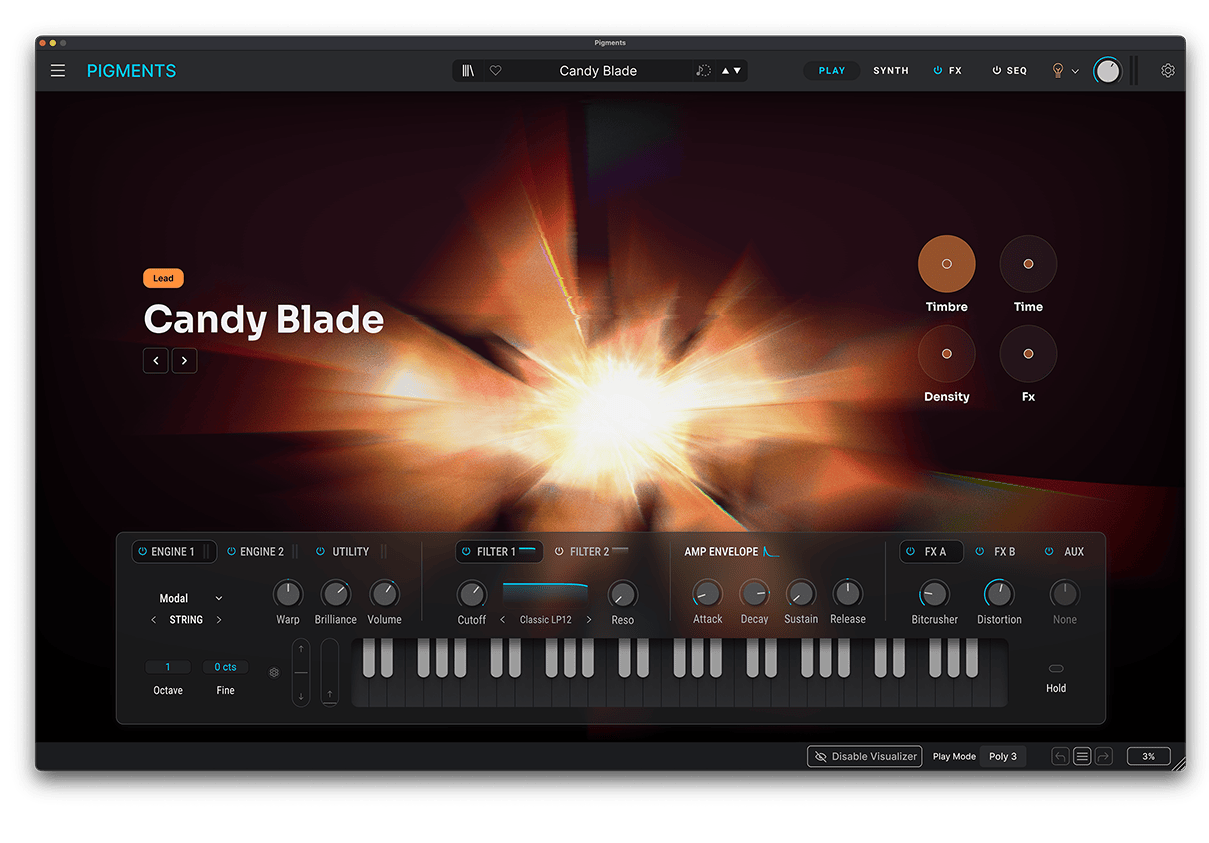
ポリクローム・ソフトウェア・シンセサイザー。
1. Arturia Software Center(ASC)をダウンロードしてインストールします
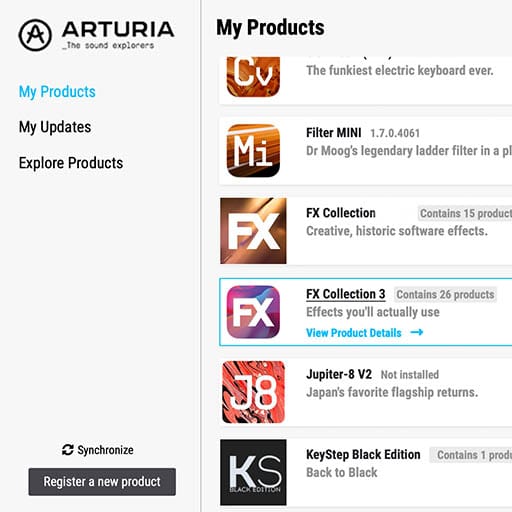
Arturia Software Center (ASC) では、Arturiaバーチャル・インストゥルメントのアクティベーション、インストール、アップデートをコンピュータ上で行うことができます。
Arturiaの他のソフトウェアのデモ版だけでなく、お持ちのソフトウェアにもアクセスできます。
2. Arturia Software Centerにログインします。
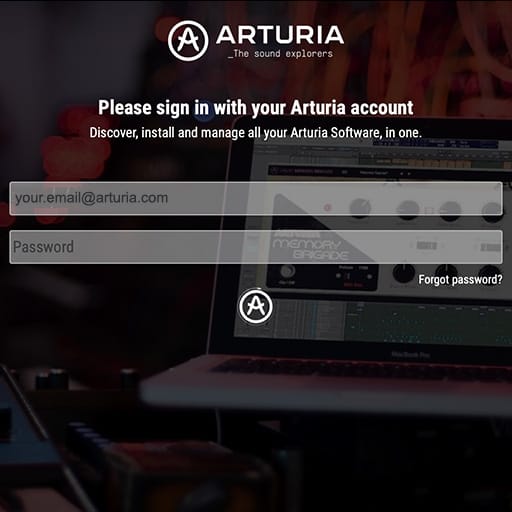
My Arturiaアカウントと同じメールアドレスとパスワードを入力します。その後、製品ライセンスがメインパネルに表示されます。
My Arturiaアカウントをお持ちでない場合は、「Create Account」(アカウント作成) をクリックし、表示される手順に従ってアカウントを作成してください。
オフラインのコンピュータをお使いの場合は、以下に記載の手順で行えます:オフラインの場合
Arturiaのウェブサイト上でソフトウェアのライセンスをご購入された場合、自動的にアカウントが登録されます。もしまだウェブサイト上での購入をされていない場合は、メイン画面の上部にある「Register a new product」(新しく購入した製品を登録する) ボタンをクリックしてください。
3. ASCで製品をインストールし、アクティベートします。
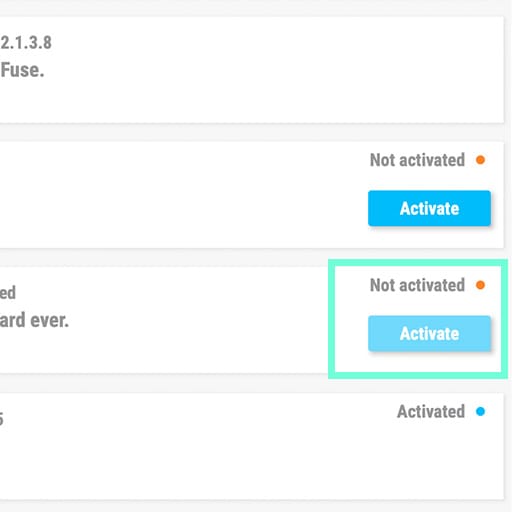
リストの中からお使いの製品を探し、「Install」(インストール) ボタンをクリックすると、サイレント・インストールが始まります。
初回は保存先フォルダを設定するよう求められます。
アクティベートされるまでは、製品はデモモードのままです。「Activate」ボタンをクリックしてください。これで新しいエフェクトがアクティベートされます。
これで、最大5台のコンピュータまで同時に使用できるようになります。他のコンピュータでも同様の操作を繰り返してください。
4. お持ちの製品を公開する
本製品はスタンドアローンではご使用いただけません。
本製品の使用には、DAW(デジタル・オーディオ・ワークステーション)が必要です。
各アイコンをクリックすると、主要なDAWでのエフェクトの読み込み方法や使い方をご覧いただけます:
探求し、実験し、存分に楽しむ。

Ableton Live

Bitwig

Cubase

FL Studio
Logic Pro X

Pro Tools

Studio One
Digital Performer
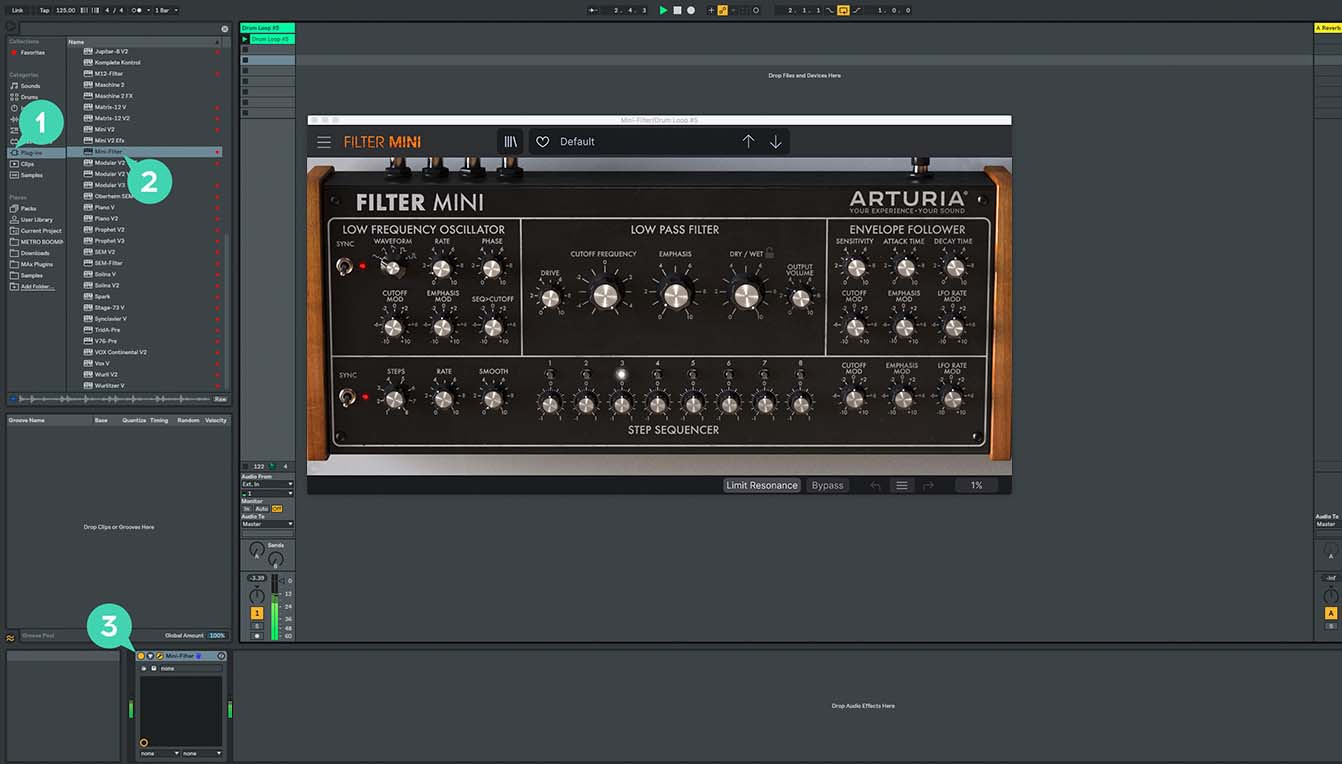
Ableton Liveの場合
1/ Liveのブラウザを開き、「Plug-ins」セクションをクリックします。
2/ VSTまたはAudio Unit*フォルダから、使用したいエフェクトを選択します。
3/ 選択したエフェクトをトラックまたはエフェクトリターンにドラッグ&ドロップします。
Pigments Play
チュートリアル
チュートリアル | Ep. 1: Overview
Discover your synth's potential
In this simple overview, Guy covers the core aspects of Pigments: our brand-new wavetable virtual analog software synth. Introducing you to the twin synth engines, dual filters, comprehensive effects section, sequencer, and modulation capabilities, this video will help you navigate this new instrument with ease.
チュートリアル | Ep. 2: Exploring the synth engines
Hybrid wavetable and virtual analog oscillators
Follow Bryan as we dive into the exciting twin-synth engine that forms the basis of Pigments' sound. We'll cover the triple-voice virtual analog engine, as well as the superbly powerful wavetable engine. Learn what every parameter does with useful sound demos, and easily master your new instrument.
Pigments
チュートリアル
チュートリアル | Ep. 1: Overview
Discover your synth's potential
In this simple overview, Guy covers the core aspects of Pigments: our brand-new wavetable virtual analog software synth. Introducing you to the twin synth engines, dual filters, comprehensive effects section, sequencer, and modulation capabilities, this video will help you navigate this new instrument with ease.
チュートリアル | Ep. 2: Exploring the synth engines
Hybrid wavetable and virtual analog oscillators
Follow Bryan as we dive into the exciting twin-synth engine that forms the basis of Pigments' sound. We'll cover the triple-voice virtual analog engine, as well as the superbly powerful wavetable engine. Learn what every parameter does with useful sound demos, and easily master your new instrument.
チュートリアル | Ep. 3: The Filters
Tame the beast, and shape your sound
Sporting twin filter slots with multiple types available, the filters in Pigments aren't just a way to shape your sound, you can use them in truly creative ways. In this episode, Guy goes over the benefits of each filter, and gives you a few tricks to try out for yourself.
チュートリアル | Ep. 4: The Effects
Explore new creative possibilities
Pigments' unique architecture lets you combine many different effects in almost limitless combinations in send and insert effect racks, all within the synth's interface. Create space, add filth, or transform your patch entirely, while still being able to modulate everything.
チュートリアル | Ep. 5: The Granular Engine
Deconstruct and improvise
An exciting ability found in Pigments' synth engine, the granular abilities of this superb instrument let you totally reimagine any sound, creating entirely new exciting tones from any sample you like.
チュートリアル | Ep. 6: Pigments 3 - Overview
The many colors of Pigments' latest enhancements
In this video we’ll be introducing the vivid new features, sounds, and advanced capabilities of Pigments 3, the latest evolution of our polychrome softsynth, built to bring new textures, timbres, and colors to your sound
チュートリアル | Ep. 7: Pigments 3 - Harmonic Engine
Create sound in vibrant harmonic detail
Sam takes a closer look at Pigments’ ultra-powerful new Harmonic engine, opening up a whole new world of sonic possibility with the power of additive synthesis.
チュートリアル | Ep. 8: Pigments 3 - Utility Engine
An extra layer to enhance any patch
In this episode we explore the new Utility engine, a useful tool for when you’re looking to expand the depth and texture of your patch. With an extra oscillator and 2 built-in noise sample players, it'll bring additional power and color to any sound.
チュートリアル | Ep. 9: Pigments 3 - Multiband Compressor
Make every frequency pop and shine
Sam introduces an essential effect that’s new with Pigments 3: the Multiband Compressor. In this video, we explore how it simultaneously fattens and tightens specific parts of your sound to cut through any mix.
チュートリアル | Ep. 10: Pigments 3 - Pitch Shift
Ambience with a difference
In this episode of our Pigments tutorial series, we’ll be looking at an addition to the FX side of things - introducing the powerful and sometimes unpredictable Pitch Shift Delay.
チュートリアル | Ep. 11: Pigments 4 - Overview
Berlin-based producer Yetundey gives you a guided tour of Pigments 4’s new features, from its customizable interface to its enhanced engines, filters, and effects.
チュートリアル | Ep. 12: Pigments 4 - How To Create Film Score Sounds
In this video, Yetundey takes you on a cinematic sound design journey with Pigments, demonstrating how to create the ultimate evocative, dramatic, and straight-up epic sounds built for big-screen atmosphere.
チュートリアル | Ep. 13: Pigments 4 - How To Create the Lo-fi Vibe
Pigments is fully-equipped to be your new go-to lo-fi sound creator. In this video, Berlin-based producer Yetundey takes you on a guided tour of the features, tricks, and ultra-chill sounds that Pigments can bring to your lo-fi beatmaking flow.
チュートリアル | Ep. 14: Pigments 4 - How To Create Neuro Bass Sounds
Want to shake the foundations with your neuro bass mixes? Look no further: in this video, Yetundey shows you how to use Pigments to create the most punishing, crunchy, skull-rattling neuro bass patches that simply hit different.
チュートリアル | Ep. 15: Pigments 5 - What is new
Follow Charly as she explore the new powers of Pigments 5: from a preview of the latest factory presets to a showcase of the revamped sequencer, and an IDM-infused demo of the new external audio processing. Not forgetting the enhanced FX routing and visual display. Pigments 5 makes it easier than ever to explore an infinite spectrum of sound.
チュートリアル | Ep. 16: Pigments 6 - What's new
Experience the evolution of sound design with Pigments 6, featuring the innovative modal engine, advanced filters, a cutting-edge vocoder, and expanded granular capabilities. Let Lena guide you through intuitive workflows, expressive modulators, and powerful new features that elevate your music production.
チュートリアル | Ep. 17: Pigments 7 - What's new
Join Alex for a walkthrough of Pigments 7, exploring the redesigned Play View, expressive new filters, the Corroder effect, engine upgrades, and fresh factory sounds - all designed to push Pigments further than ever.
チュートリアル | Pigments Play | Overview
チュートリアル | Pigments Play | Onboarding
チュートリアル | Pigments Play | How To Get Started
Pigments
ハウトゥ
チュートリアル | Track Breakdown | Pigments 6 - Granular Explorations
Follow Yetundey as she breaks down a cinematic track created with the Granular Explorations pack for Pigments 6. Dive into atmospheric layers, ethereal voices, glitchy textures, and rhythmic pulses that come together to create a dynamic, otherworldly composition.
チュートリアル | Track Breakdown | Pigments 6 - Bass Explorations
Join Lena as she breaks down Joe Sheldrick's dubstep track, highlighting the powerful bass sounds from Pigments 6’s Bass Explorations pack. From Dusty Sub to Granular Gun, discover how each unique bass patch adds depth, texture, and movement to the track.
チュートリアル | Track Breakdown | Pigments 6 - Lo-Fi Explorations
Follow Lena as she dissects a captivating track made with the Lo-Fi Exploration pack for Pigments 6. Explore how textured harmonies, airy melodies, lush pads, and rich bass elements combine to create a nostalgic yet fresh sound.
チュートリアル | Track Breakdown | Pigments 7 - IDM Explorations
Be guided by Alex through the evolving keys, modal textures, punchy basses, and glitch-driven FX of an IDM-inspired track, showcasing IDM Explorations - one of three new 150-preset expansions for Pigments.
チュートリアル | Track Breakdown | Pigments 7 - Dubstep Explorations
Be guided by Alex through high-impact bass design, explosive wobbles, laser-style leads, and formant-driven hooks in a hard-hitting dubstep track, showcasing Dubstep Explorations - one of three new 150-preset expansions for Pigments.
チュートリアル | Track Breakdown | Pigments 7 - Hazy Explorations
Be guided by Matt through the lush keys, modal textures, Reese basses, and sparkly vocal textures of a Hazy track by sidejoy., showcasing Hazy Explorations - one of three new 150-preset expansions for Pigments.
チュートリアル | Track Breakdown | Pigments 7 - Rave Explorations
Be guided by Alex through a high-energy, rave-inspired track by Sami Rabia, built with the euphoric keys, uplifting textures, punchy basses and aggressive leads of Rave Explorations, one of three new 150-preset expansions for Pigments.
チュートリアル | Track Breakdown | Pigments 6 - Modal Explorations
Follow Brendan as he dissects a drum & bass composition by Victor Morello. From punchy basslines and crystalline arps to layered atmospheres and tension-building transitions, we uncover some of the core presets driving the track.
チュートリアル | Track Breakdown | Pigments - Trap Explorations
Follow Lena as she takes you through the ins and outs of Trap Explorations and dissects a track to reveal its sound design elements.
チュートリアル | Track Breakdown | Pigments 5 - Beats Explorations
Follow Lena as she explores the sonic range of Beats Explorations. Featuring an experimental trap arrangement by Katsen, we dive into some key, bass and lead sounds that give the track a playful and dream-like character.
チュートリアル | Track Breakdown | Pigments 5 - Liquid Explorations
Lena takes us through the evocative underground sounds of Liquid Explorations and unpacks a 90's-style liquid drum & bass arrangement by Trails - ideal for crafting a hard-hitting, high-tempo UK sound with added depth and texture.
チュートリアル | Track Breakdown | Pigments 5 - Expressive Explorations
Be guided by Lena through the rich, evolving ambiences and organic textures of a unique composition by Heather Fenoughty, showcasing the augmented synth aesthetics, movement and tonal range of Expressive Explorations - designed to evolve as you play.
プリセット
サウンドデモ
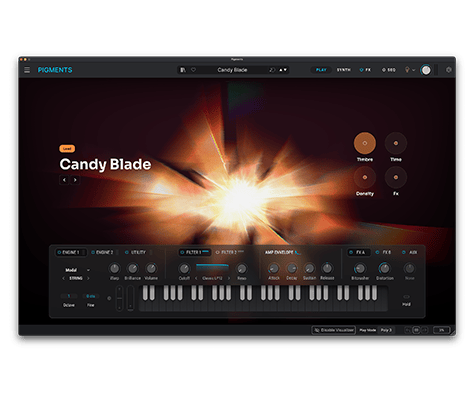
ご存知の通り、Pigmentsには何百ものパワフルなプリセットが内蔵されており、サウンドが素晴らしいだけでなく、サウンドデザイナーが使用するシンセシスや高度なテク肉を学ぶのにも最適です。電球アイコンをクリックすると、プリセットの作成者のメモを読むことができ、音作りのための推奨パラメーターも表示されます。
Pigmentsの素晴らしいプリセットをいくつか聴いてみましょう。
Pigments Play
ソフトウェア
マニュアル
Pigments Play JA Manual
バージョンja - 6.0.0|144.1 MB|9/3/2025
Pigments
ソフトウェア
マニュアル
Pigments JA Manual
バージョンja - 6.0.0|144.1 MB|9/3/2025